VPN Server Protocol: V2Ray
Server Providers: AWS Lightsail, AWS EC2, Google Cloud, Alibaba Cloud.
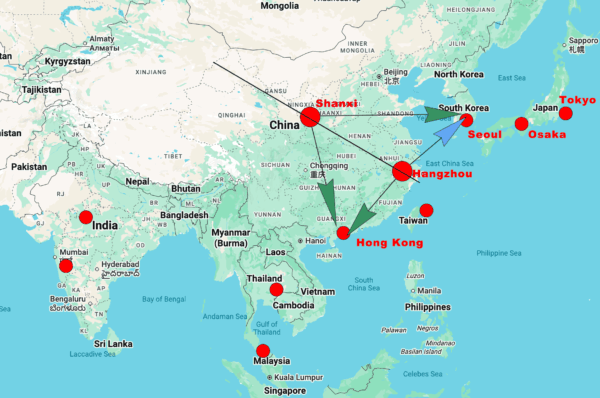
Server Locations: Hong Kong/Singapore
Client Location: China(Shenzhen)/Hong Kong
Testing Tools: Ping, iperf3, speedtest-cli, testmy.net, speed.cloudflare.com
Remarks: Turn UDP replay off for realtime use, Turn UDP replay on for speed.
| Provider / Server | Test Location | Direct Ping (Loss / Avg Latency) | Direct iperf Throughput | Proxy Test (Cloudflare via V2Ray) | Remarks |
|---|---|---|---|---|---|
| GCP (Hong Kong) | China(Shenzhen) | 20% loss, 24.9 ms | ~3.1 Mbit/s | 31.2% loss, 19.5/8.2 Mbps, “Average” | High loss and low throughput; unusable for streaming. |
| Lightsail (Singapore) | China(Shenzhen) | 10% loss, 203 ms | ~3.9 Mbit/s | Not tested (latency only) | High latency and loss; poor for real‑time use. |
| EC2(Hong Kong) | China(Shenzhen) | 0% loss, 123 ms | ~2.7 Mbit/s | 69.4% loss, 6.1/5.3 Mbps, “Bad” | Direct loss‑free but capped; proxy catastrophic. |
| Alibaba(Hong Kong) | China(Shenzhen) | 0% loss, 15.3 ms | ~3.8 Mbit/s | 77.9% loss, 22.8/11.2 Mbps, “Bad” | Excellent direct latency but same cap; proxy unusable. |
| GCP(Singapore) | Hong Kong | 0% loss, 61.2 ms | 33.8 Mbit/s | • UDP relay off: 94/147 Mbps, high jitter, “Bad” • UDP relay on: 118/144 Mbps, 26% loss, “Bad” | V2Ray still degrades performance, but the raw link is capable. |
- Google Cloud Hong Kong V2Ray Server: Purchased a server on uuProxy, select the GCP as the provider, V2Ray as the protocol, machine-type is balanced, premium network speed, server location is Hong Kong(asia-east2), hours and data can be any number. Test Performances: Connection Latency, Bandwidth, and Speed. and test location is in China(Shenzhen)
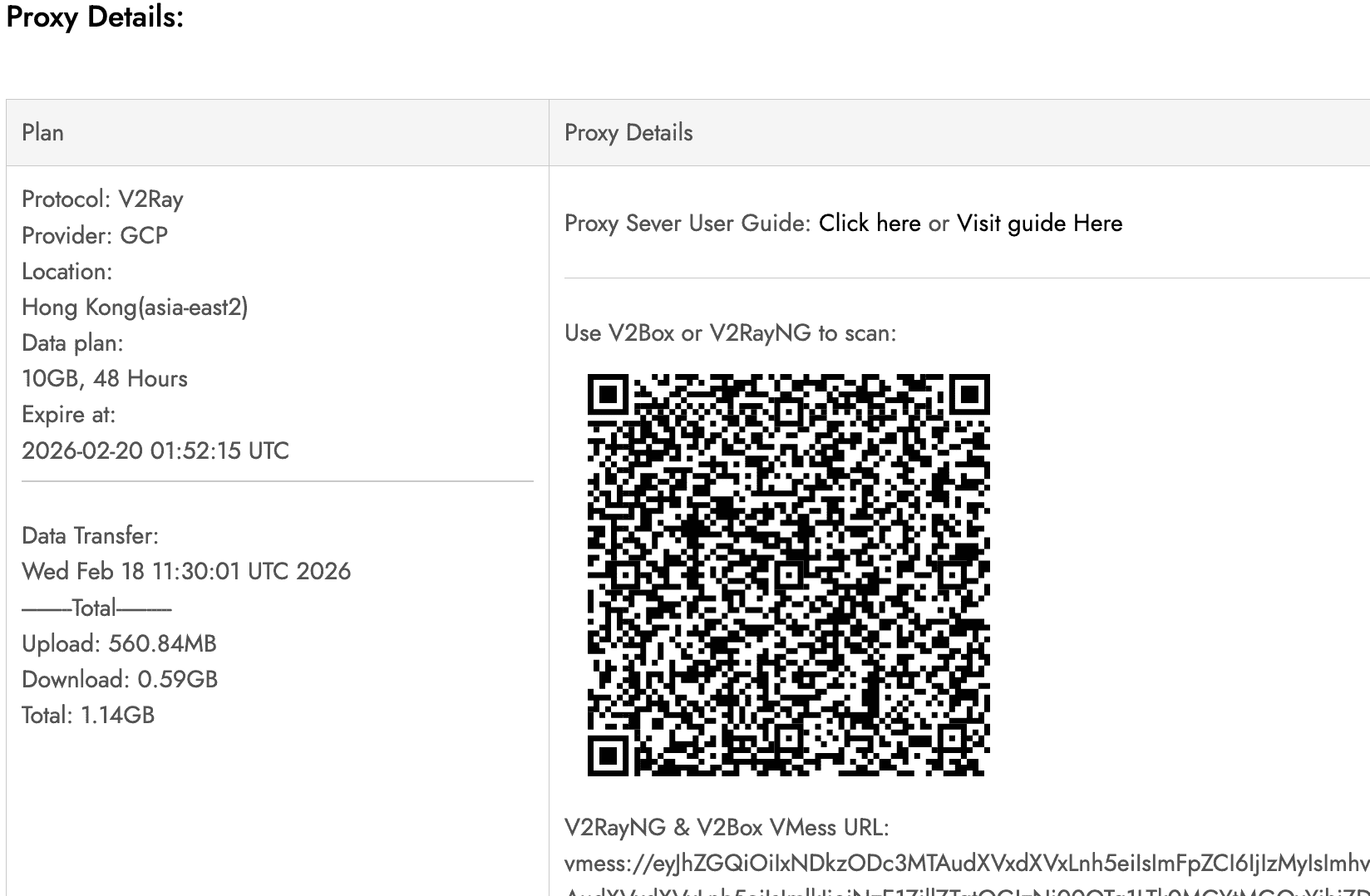
1.1. Connection Latency: Firstly, we use PING test, without connect to v2ray, use China Telecom through WiFi.
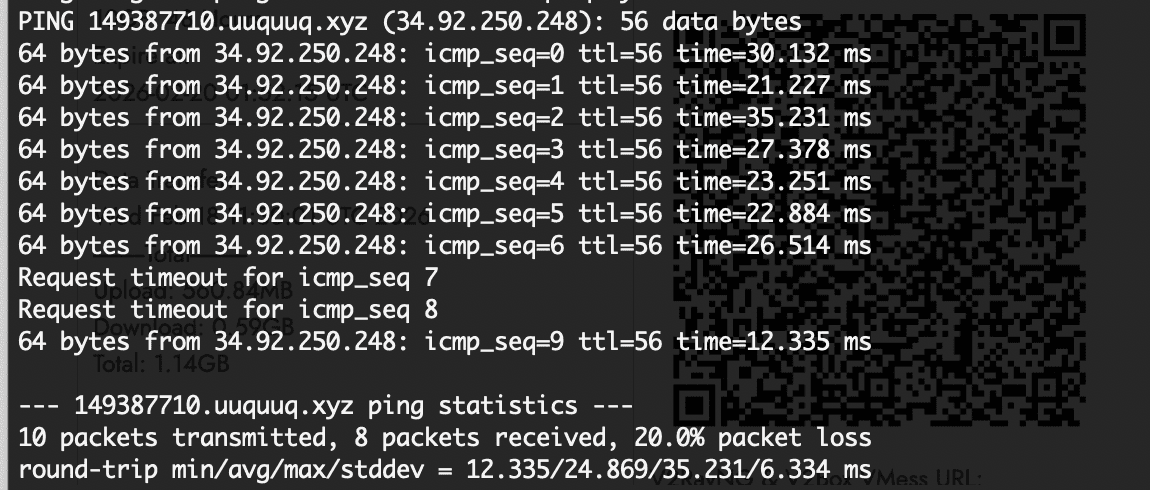
- Latency: The average RTT (~25 ms) is very good, typical for a well-connected server (likely within the same region).
- Packet Loss: 20% loss is concerning.
- Jitter: The standard deviation (6.3 ms) is moderate.
and we have another test to the worldwide servers on the online website side, you can check it on the site: https://testmy.net/latency?gID=ix2qct0net
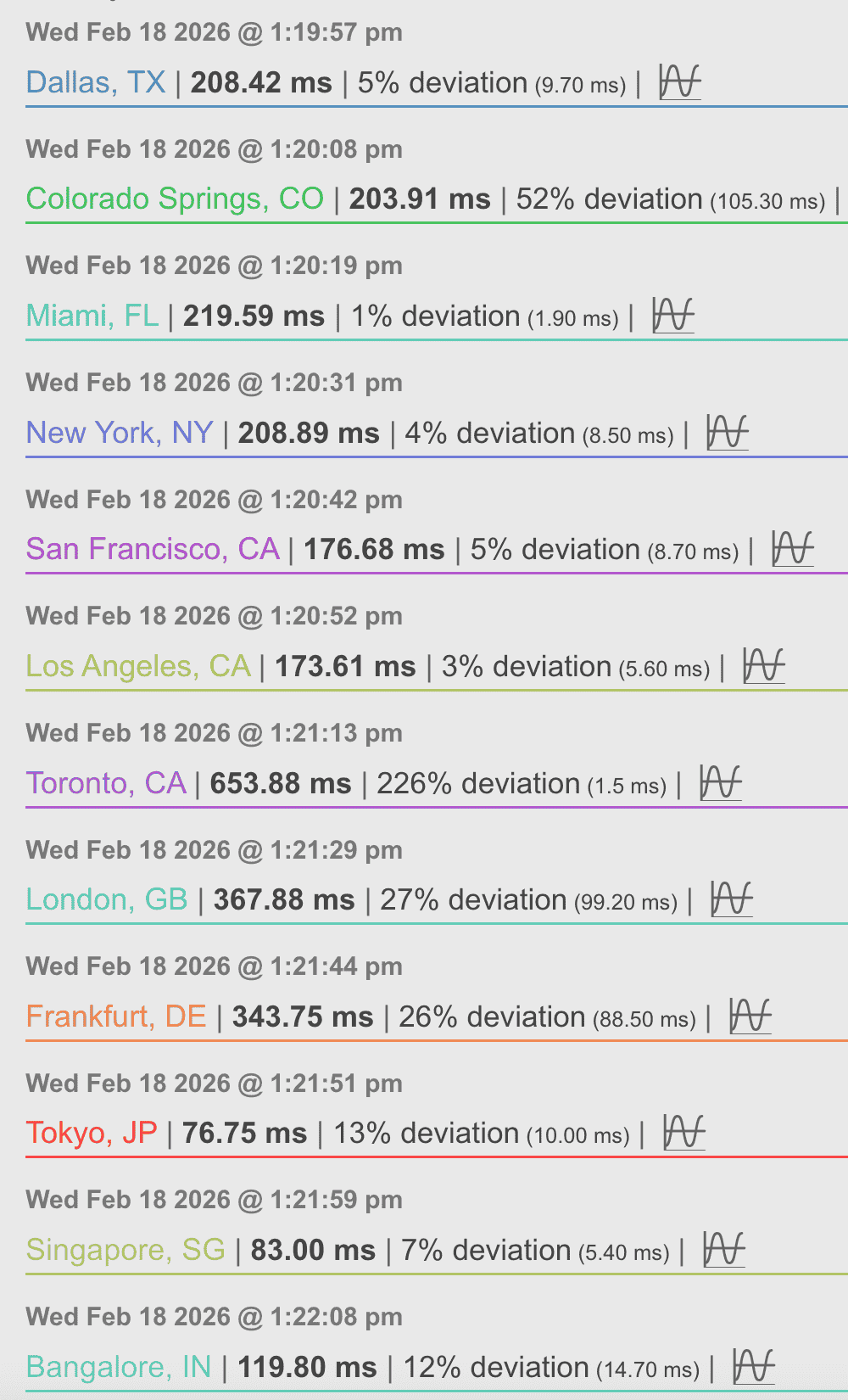
1.2. Bandwidth and speed test: we use iperf3 test it on the server and client side.
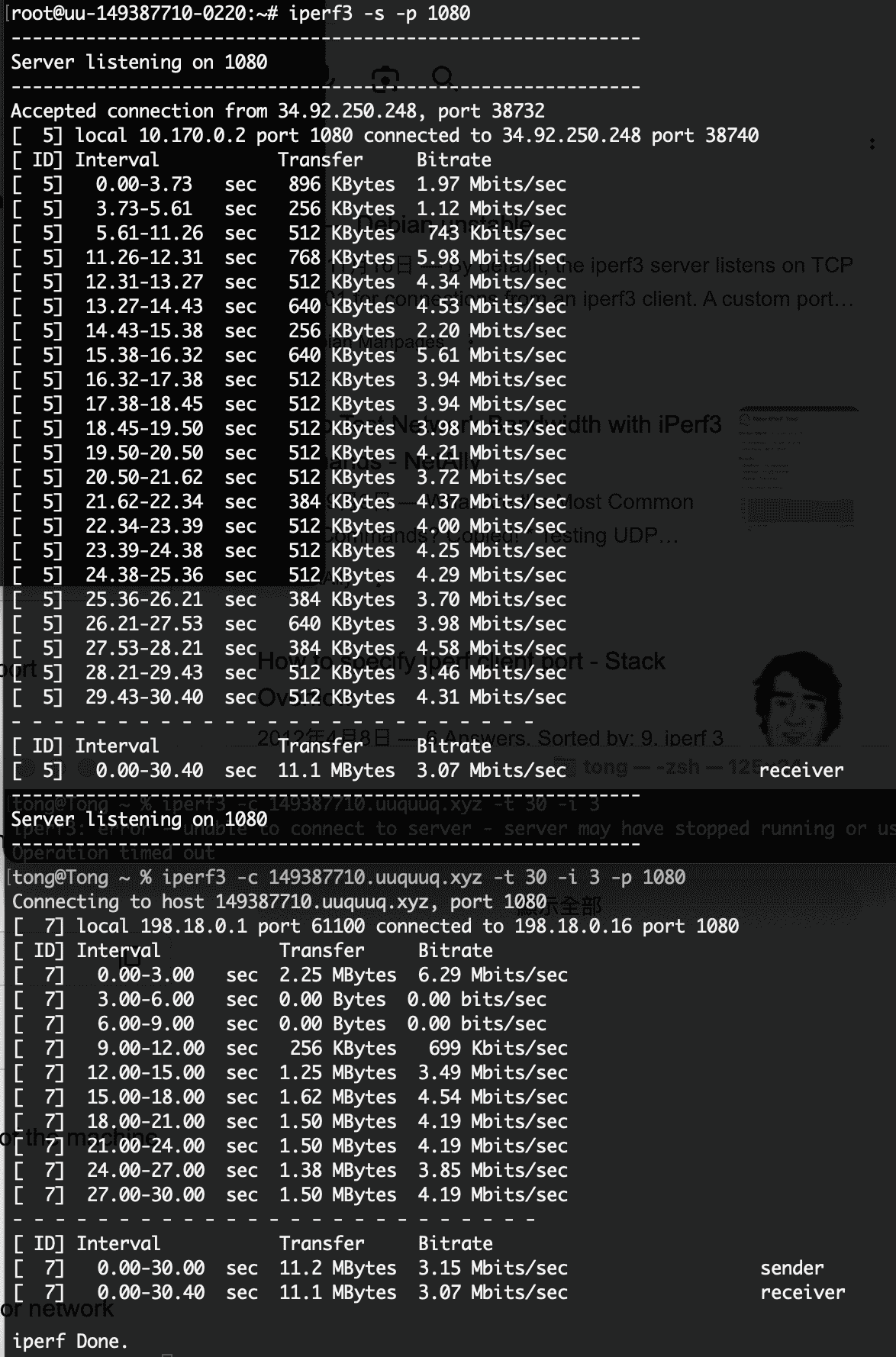
The iperf3 test shows an average throughput of about 3.07 Mbits/sec, with significant fluctuations and periods of no data transfer. This is likely due to the high packet loss (20%) observed earlier, causing TCP to throttle. The connection is unreliable and slow.(maybe in the middle night, network connection not stable).
We alse started another test on cloudflare. The Cloudflare speed test confirms that the server’s own internet connection is experiencing severe packet loss (31.2%) and high jitter (spiking to 74.2 ms), even when communicating with a well-connected CDN server. This explains the poor iperf3 throughput (~3 Mbps) and the intermittent connectivity observed earlier: the loss is not just on the client–server path but originates from the server’s network or its ISP. Despite decent base latency (~22–30 ms), the loss renders the connection unreliable for any sustained data transfer or real-time applications.
1.3. Server side connection and speed test: we use speedtest-cli on the server to have a test.
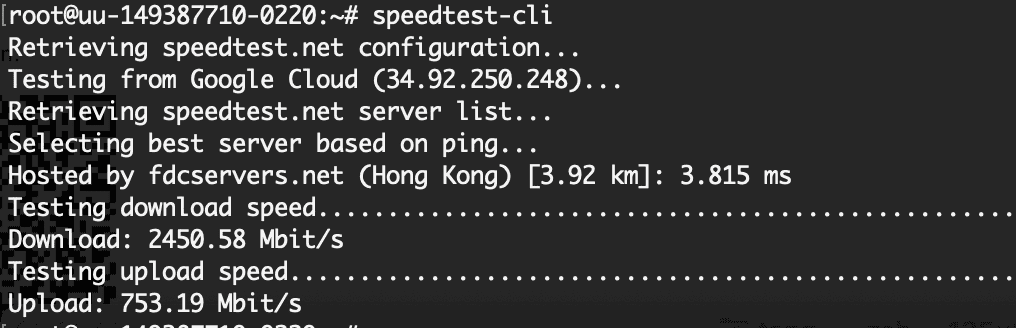
The speedtest-cli result shows that the server itself has an excellent network connection:
- Download: 2.45 Gbps
- Upload: 753 Mbps
- Ping to a Hong Kong server: 3.8 ms
This confirms that the server is not the bottleneck—it is hosted on Google Cloud with high-speed infrastructure. However, all previous tests from our client in Shenzhen (ping with 20% loss, iperf3 at ~3 Mbps, Cloudflare speed test with 31% loss) indicate that the path between China and Hong Kong is severely congested or throttled. The server’s own speed test only measures its link to a local server, not the cross-border route.
Based on all the data—20% packet loss from Shenzhen to Hong Kong (ping), ~3 Mbps effective throughput (iperf3), and 31.2% packet loss on the server’s own Cloudflare test—the performance for a user in Shenzhen is poor and unreliable. While the server’s raw bandwidth (~20 Mbps down) might seem adequate, the high packet loss cripples TCP throughput and causes frequent timeouts, making it unsuitable for consistent streaming or real-time applications.
What to Expect(GCP Hong Kong V2Ray Server):
- YouTube / Video Streaming: Only low resolutions (e.g., 480p) may work, but buffering will be frequent. 720p+ will likely stall.
- Browsing abroad news: Text-based sites will load slowly but might be usable; pages with images or videos will be frustrating.
- Other services: Gaming, VoIP, or large downloads are nearly impossible due to high loss and jitter.
2. AWS Lightsail Singapore V2Ray Server: Lightsail no Hong Kong region, we use Singapore instead.
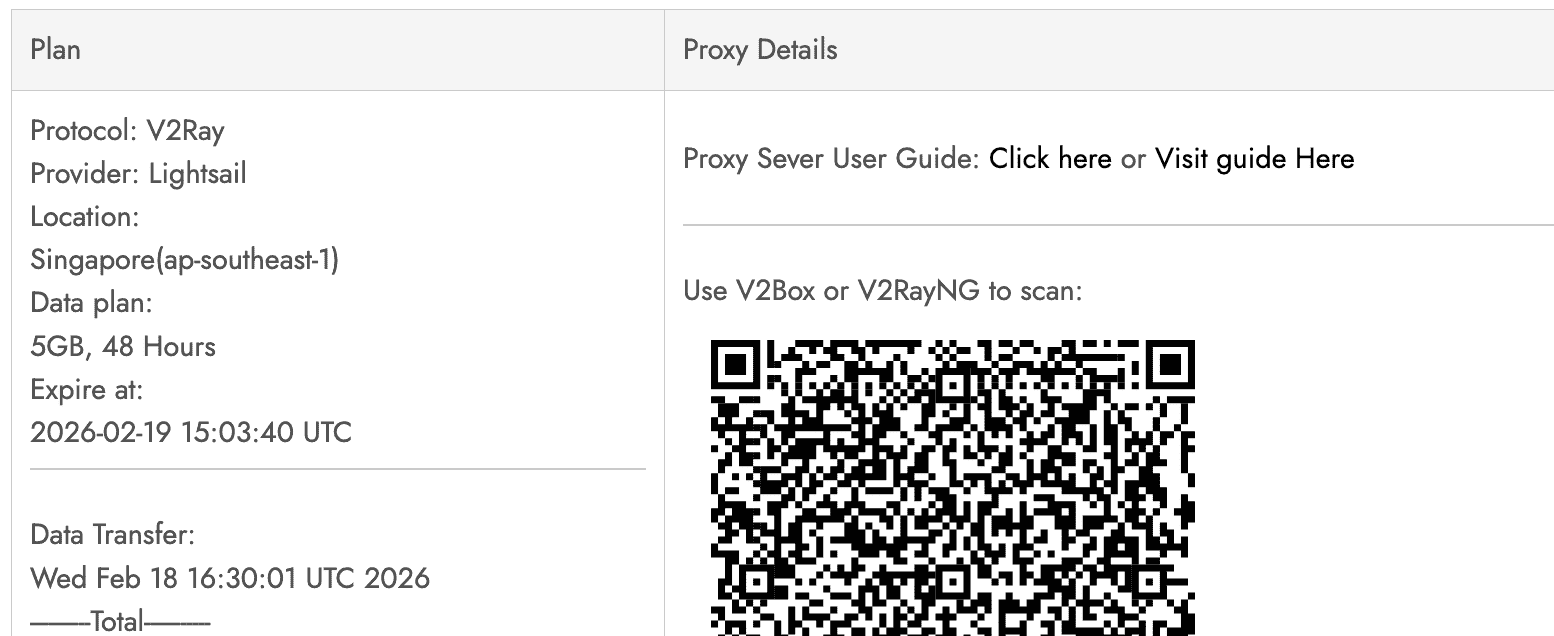
2.1. Server side speed test, we use speedtest-cli:
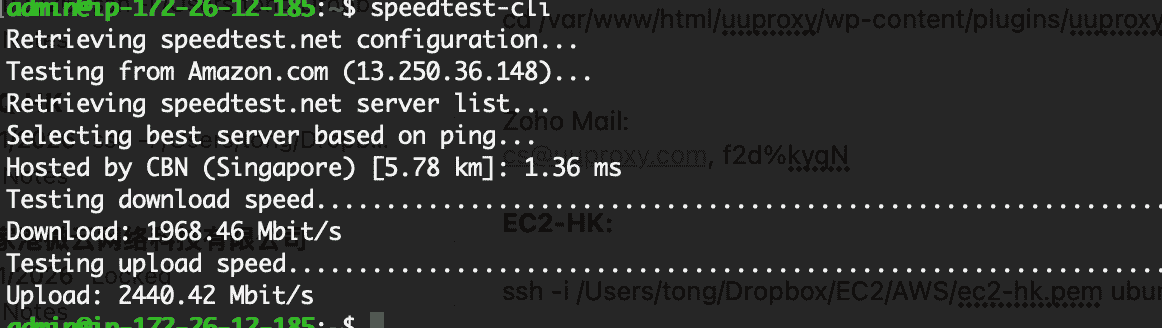
The speedtest-cli result from the Singapore server shows an excellent local network connection:
- Download: 1.97 Gbps
- Upload: 2.44 Gbps
- Ping to a local server: 1.36 ms
This confirms that the server itself (an AWS instance in Singapore) has a high-speed, low-latency connection to the internet within Singapore. However, this test only measures the server’s link to a nearby speed test server.
2.2. Latency PING test from client side in China Shenzhen(without connecting to the server, just use local telecom).
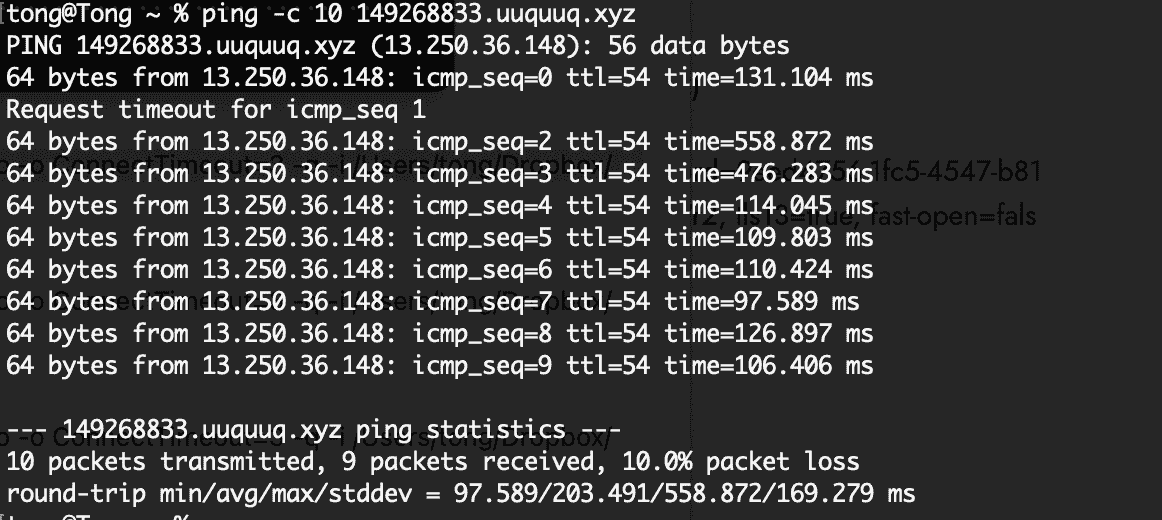
The ping test from Shenzhen to the Singapore server shows 10% packet loss and high, erratic latency (average 203 ms, with spikes over 550 ms). This confirms that the cross-border route from China to Singapore is also congested and unreliable. While the loss is slightly lower than the GCP Hong Kong server (20%), the latency is significantly higher, which will degrade performance for any application.
We alse did an online latency test, you can find it here: https://testmy.net/latency?gID=sazz9b0qqt
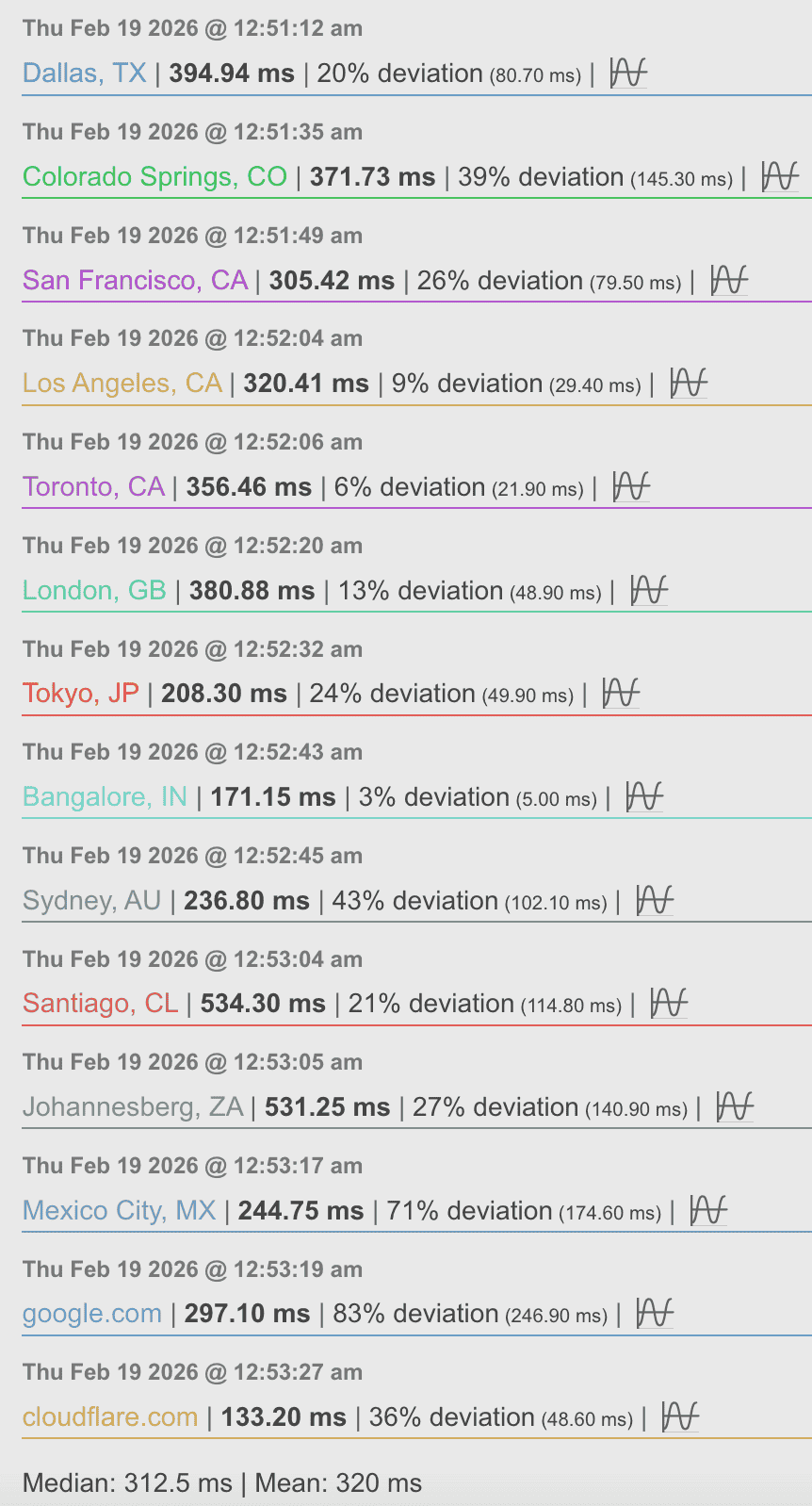
The lighstail v2ray server’s connectivity to global destinations is poor, with high latency and jitter, making it unsuitable for reliable proxy use. The combination of poor China-Singapore path and poor server international routes means that any traffic through this proxy will experience significant delays and packet loss.
2.3. Bandwidth and speed test: we use iperf3 test it on the server and client side.
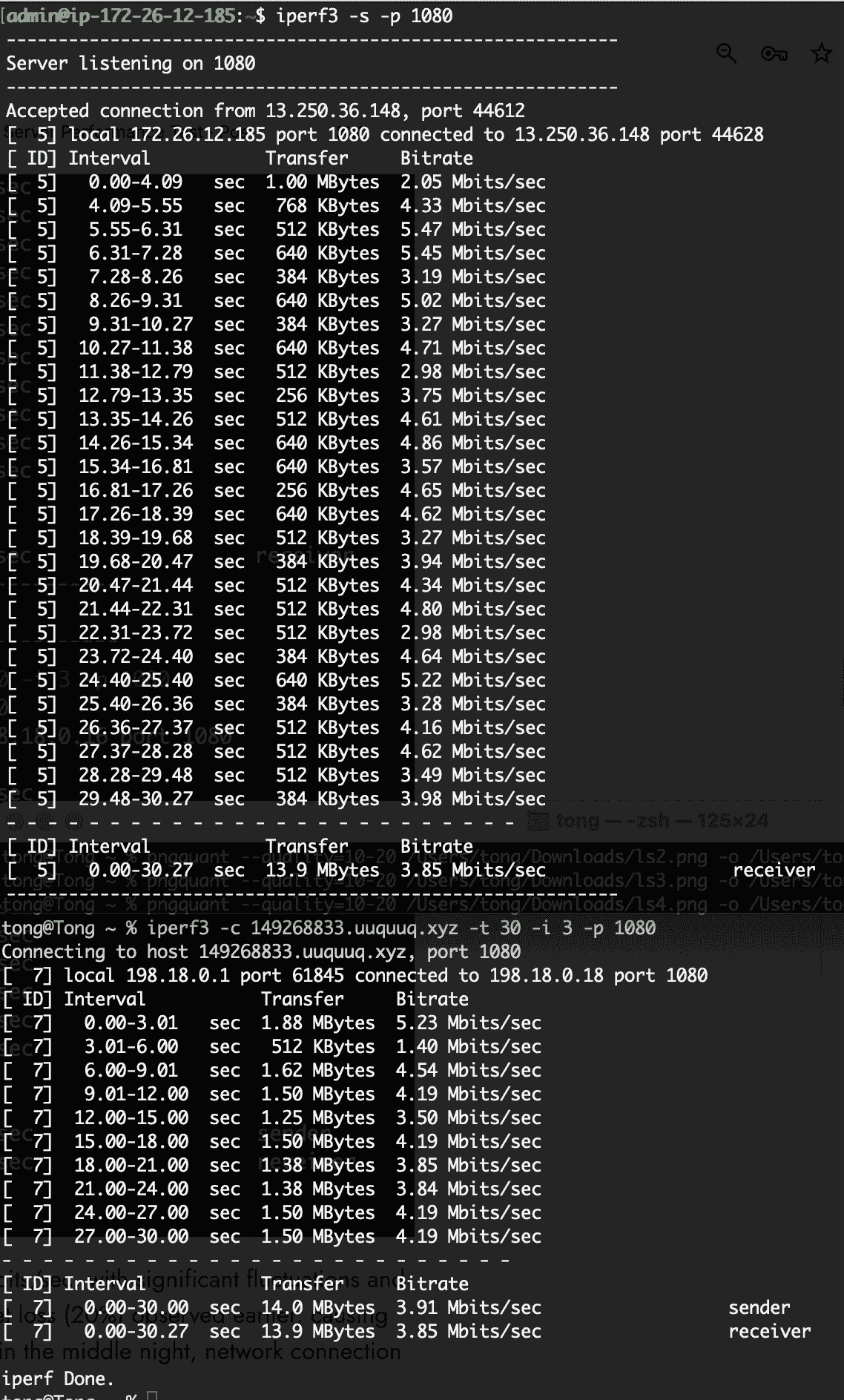
The iperf3 test confirms that the effective throughput from your Shenzhen client to the Singapore Lightsail server is only ~3.85 Mbits/sec, despite the server’s own high-speed connection (2.4 Gbps upload). This matches the ping test’s 10% packet loss and high latency (avg 203 ms, spikes >550 ms), which severely throttle TCP throughput. The erratic transfer rates (with intervals as low as 1.4 Mbits/sec) indicate frequent congestion and retransmissions.
The Lightsail Singapore server offers no meaningful improvement over the Hong Kong server—both suffer from severe cross-border congestion. The server itself is powerful, but the China–international route is the bottleneck.
Implications(AWS Lightsail V2Ray Server)
- YouTube / Streaming: Only low resolutions (e.g., 480p) may buffer constantly; 720p+ will likely stall.
- Browsing: Text-based sites may load slowly; media-rich pages will be frustrating.
- Other services: Real-time apps (VoIP, gaming) are impractical due to loss and jitter.
3. Alibaba Cloud Hong Kong V2Ray Server: Alibaba Cloud(Aliyun) is a Chinese Cloud service provider, we suppose it may provide more optimism network speed.
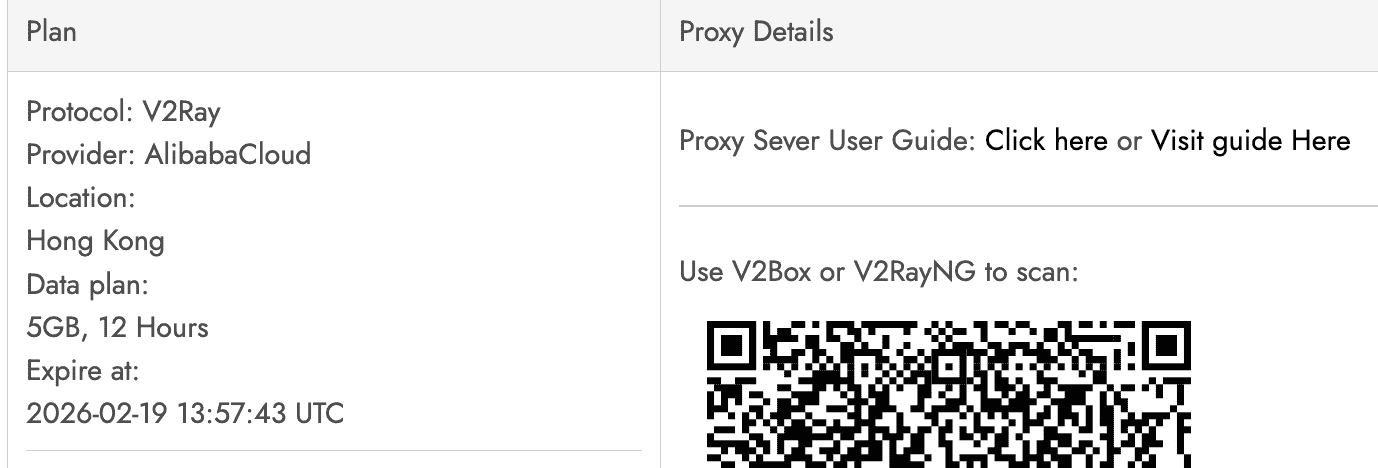
3.1. Server side speed test, we use speedtest-cli:
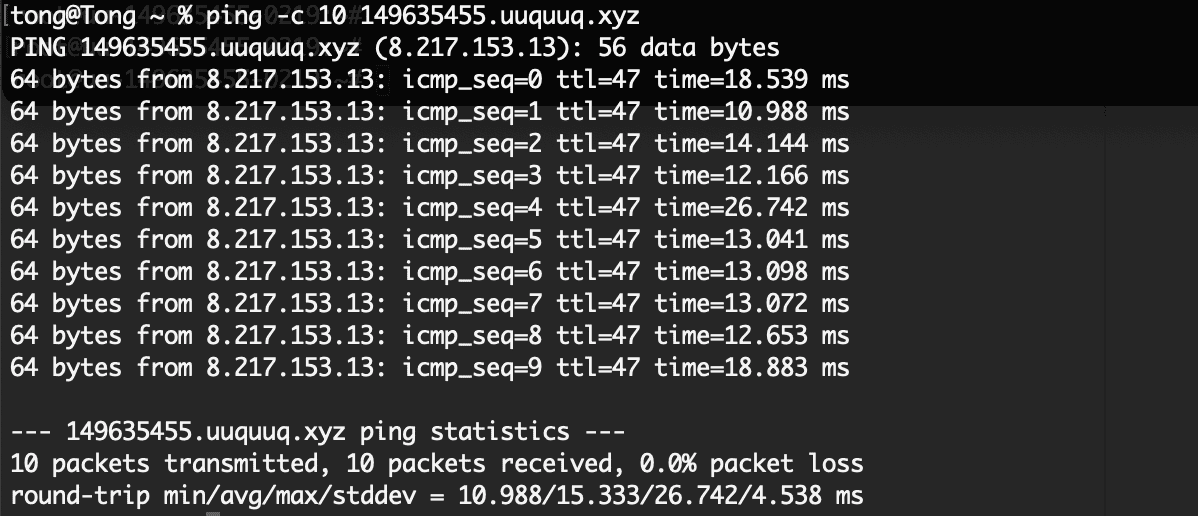
The Alibaba Cloud server in Hong Kong shows a solid but not exceptional local connection:
- Download: 109 Mbit/s
- Upload: 116 Mbit/s
- Ping to a local server: 5.3 ms
This is significantly lower than the Google Cloud (2.45 Gbps) and AWS (2.4 Gbps) servers, but that’s irrelevant for our use case—what matters is the cross-border performance from Shenzhen.
3.2.PING test:
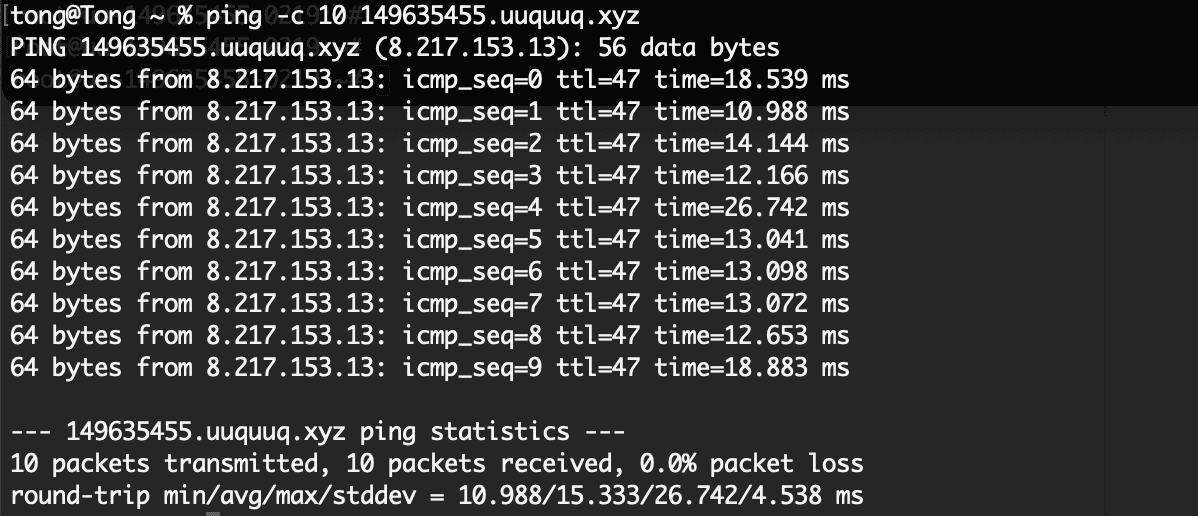
This ping test from Shenzhen to the Alibaba Cloud Hong Kong server shows excellent results:
- 0% packet loss (10/10 received)
- Low average latency: 15.3 ms
- Low jitter: standard deviation 4.5 ms
This is a dramatic improvement over the previous Google Cloud HK (20% loss) and AWS Singapore (10% loss, 203 ms avg) servers. The Alibaba server clearly has a much better optimized route into China
We was blocked by testmy.net when we used alibaba cloud v2ray server to visit this website.

3.3. Bandwidth and connection speed test: we use iperf3 from server and client sides.
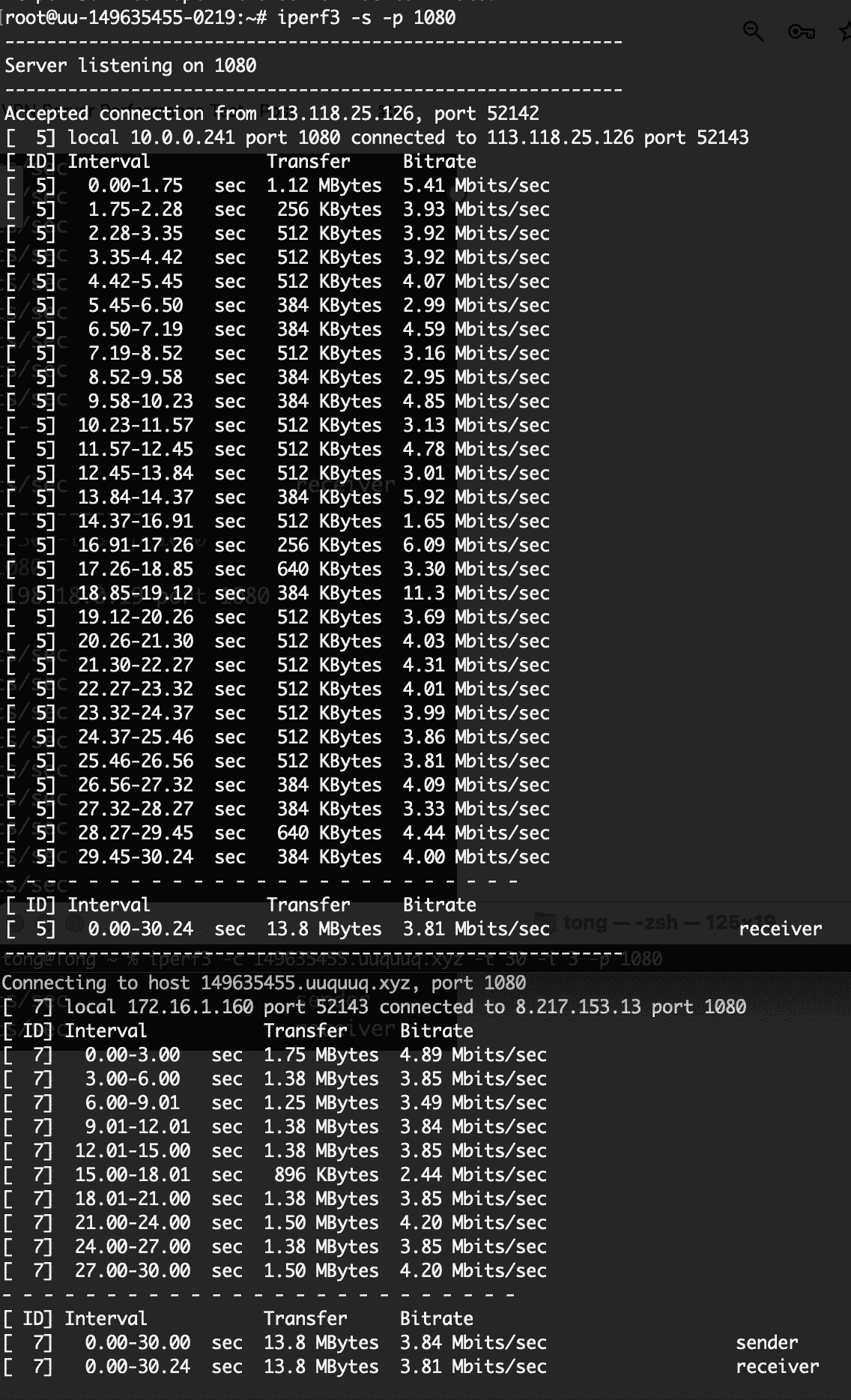
The iperf3 test from your Shenzhen client to the Alibaba Cloud Hong Kong server shows a stable but capped throughput of approximately 3.8–3.9 Mbits/sec. it confirms that despite 0% packet loss and low latency (~15 ms), the cross-border path is rate-limited—likely by ISP’s international bandwidth policy or congestion on the China–Hong Kong gateway.
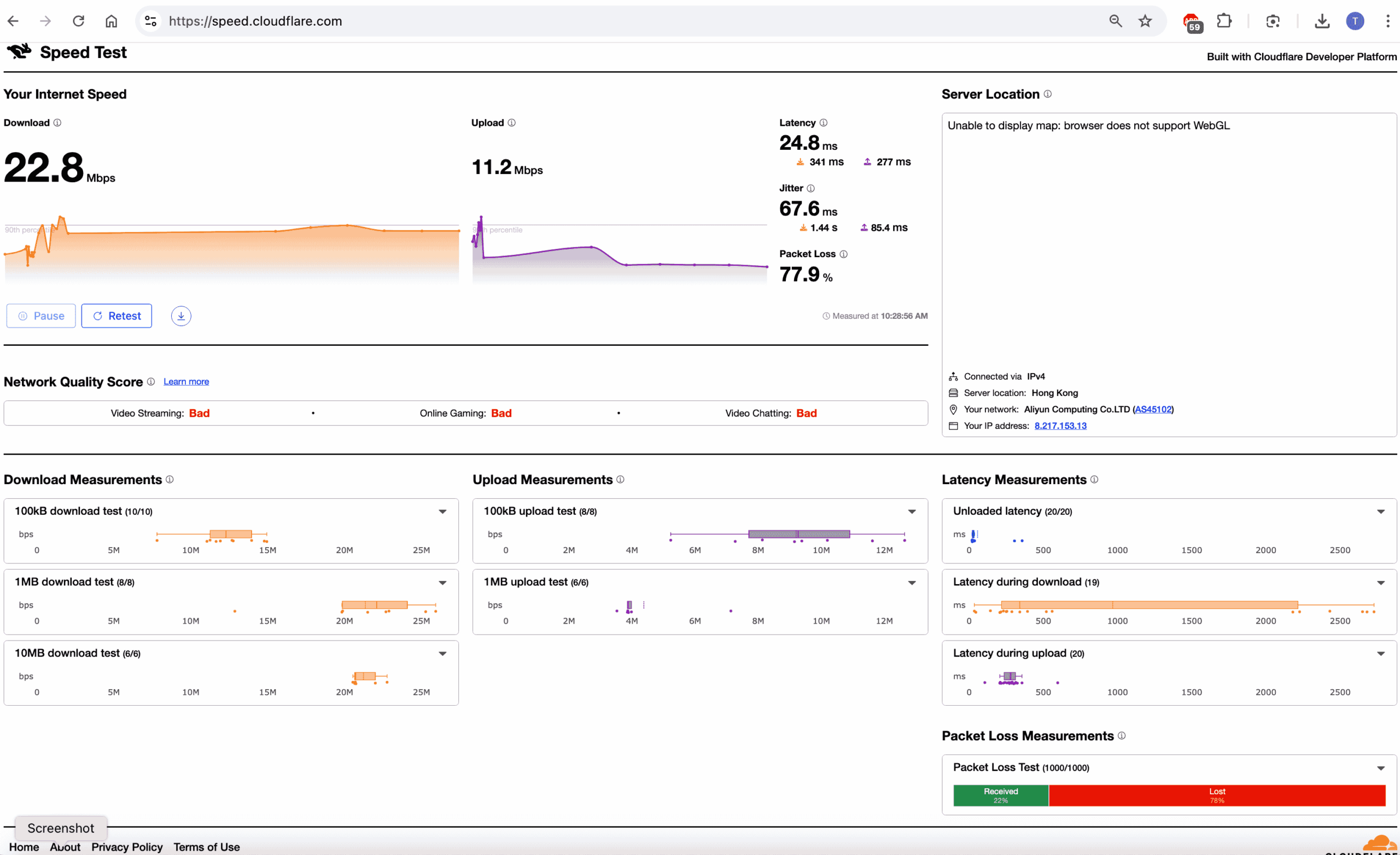
This Cloudflare speed test, conducted through the V2Ray proxy to the Alibaba Cloud Hong Kong server, reveals catastrophic performance:
- Packet loss: 77.9%
- Jitter spikes: up to 1.44 seconds
- Latency: highly erratic (24.8 ms baseline, but spikes to 341 ms and 277 ms)
- Network Quality Score: “Bad” for all categories (Video Streaming, Online Gaming, Video Chatting)
The previous direct ping and iperf3 tests from Shenzhen client to the Alibaba server showed 0% loss, low latency (~15 ms), and stable but capped throughput (~4 Mbps). However, this test was routed through the V2Ray proxy, which adds encryption, encapsulation, and potentially a different network path. The extreme loss and jitter indicate that the proxy tunnel itself is failing
Implication for Your Use(Alibaba Cloud Hong Kong V2Ray Server)
- YouTube / Streaming: Smooth playback at 720p (requires 3–5 Mbps). 1080p may buffer if bitrate spikes above the cap.
- Browsing: Fast and responsive due to low latency.
- Other services: Real-time apps (VoIP, gaming) will work well because of low loss and jitter, but large downloads are capped.
4. AWS EC2 Hong Kong V2Ray Server: we prepare to test the aws ec2 server beyond the lightsail.
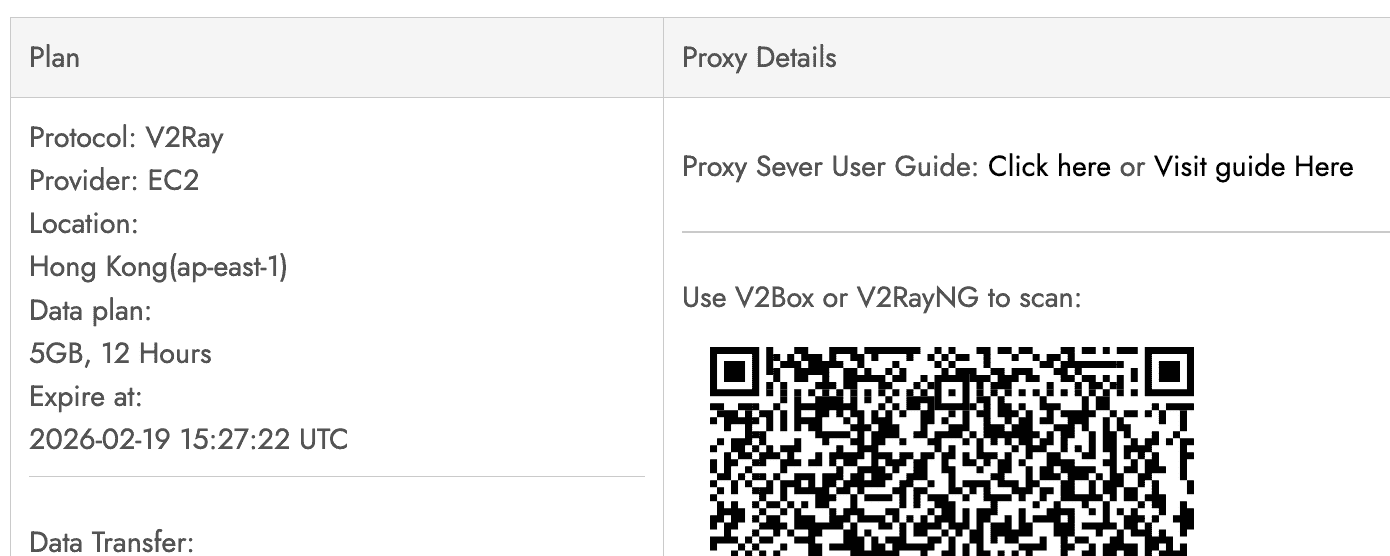
4.1. Firstly, server side speed test via speedtest-cli.
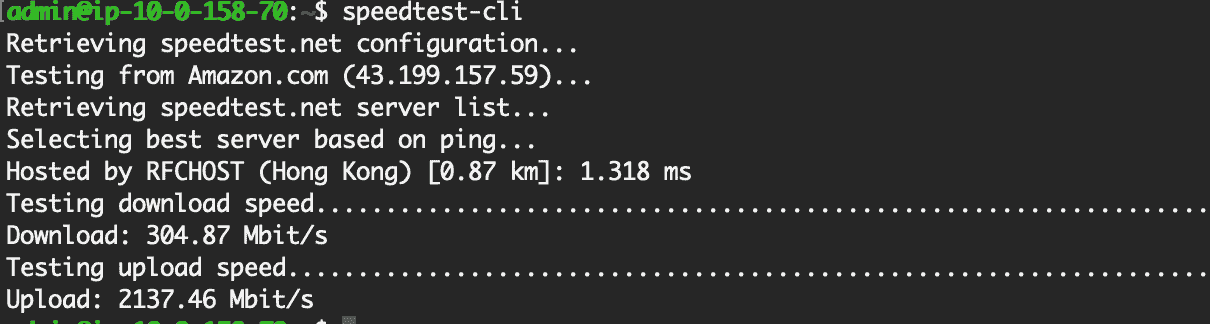
The AWS EC2 Hong Kong server shows excellent local network performance:
- Download: 304.87 Mbit/s
- Upload: 2,137.46 Mbit/s (2.1 Gbps)
- Ping to local server: 1.3 ms
4.2. PING test and latency test via https://testmy.net/latency?gID=dx36ikun4w
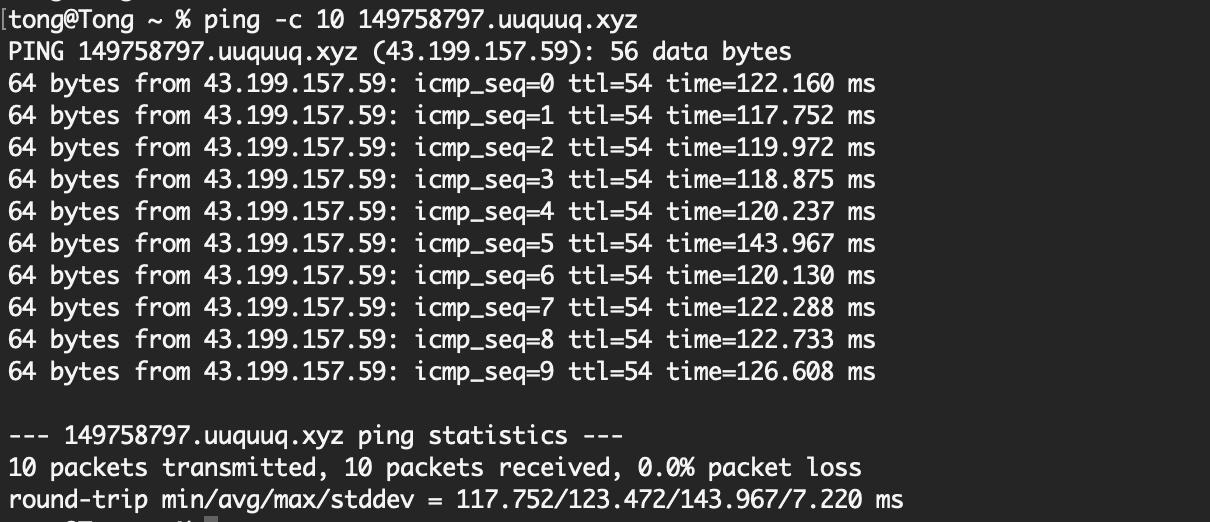
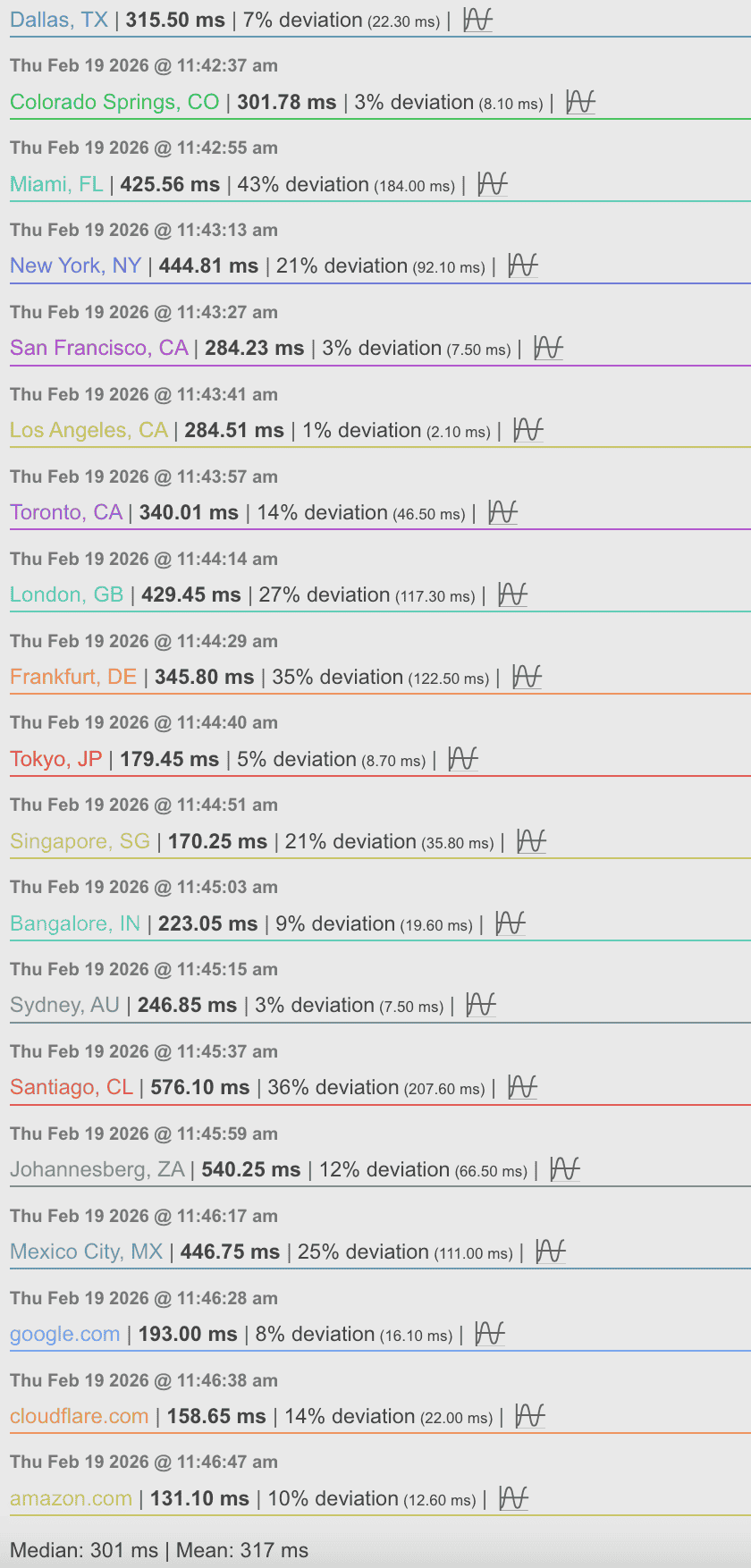
The AWS EC2 Hong Kong server shows 0% packet loss and stable latency from Shenzhen, but with a higher average RTT of ~123 ms compared to the Alibaba HK server’s 15 ms. This indicates a different, less direct routing path, though still reliable. The testmy.net latency results (via V2Ray) confirm that the server itself has normal global connectivity, with latencies consistent for a Hong Kong location.
- Direct ping (Shenzhen → AWS HK): 0% loss, avg 123 ms, low jitter (7 ms). This is a significant improvement over the Google Cloud HK (20% loss) and AWS Singapore (10% loss, 203 ms), but worse than Alibaba HK (15 ms).
- Via V2Ray (testmy.net): Latencies to global destinations are typical (e.g., Tokyo 179 ms, Singapore 170 ms, Google 193 ms), indicating the proxy tunnel is functioning without additional loss or extreme jitter—unlike the Alibaba case where the proxy caused 78% loss.
4.3. iperf3 test from server and client sides, and speed test from cloudflare.
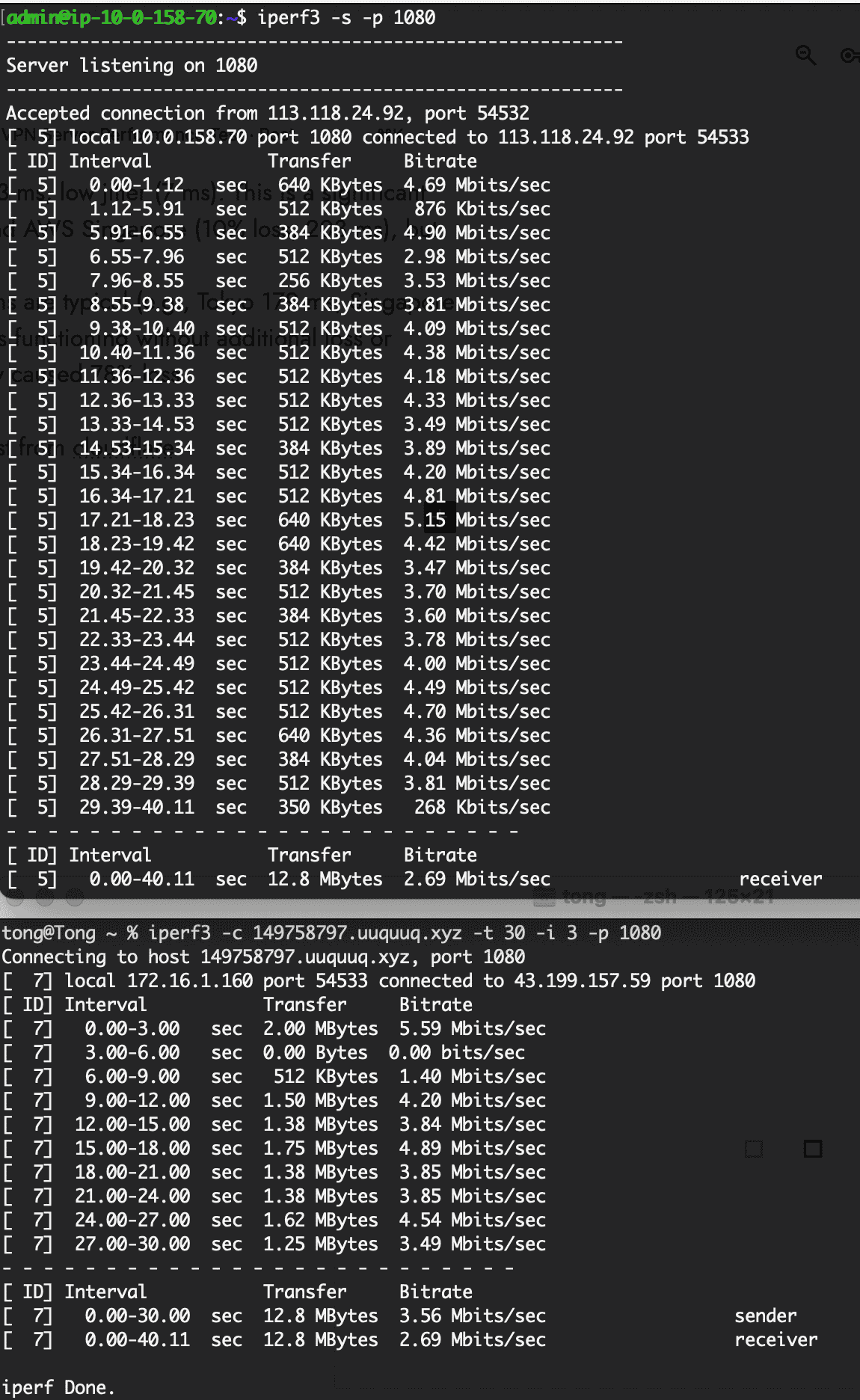
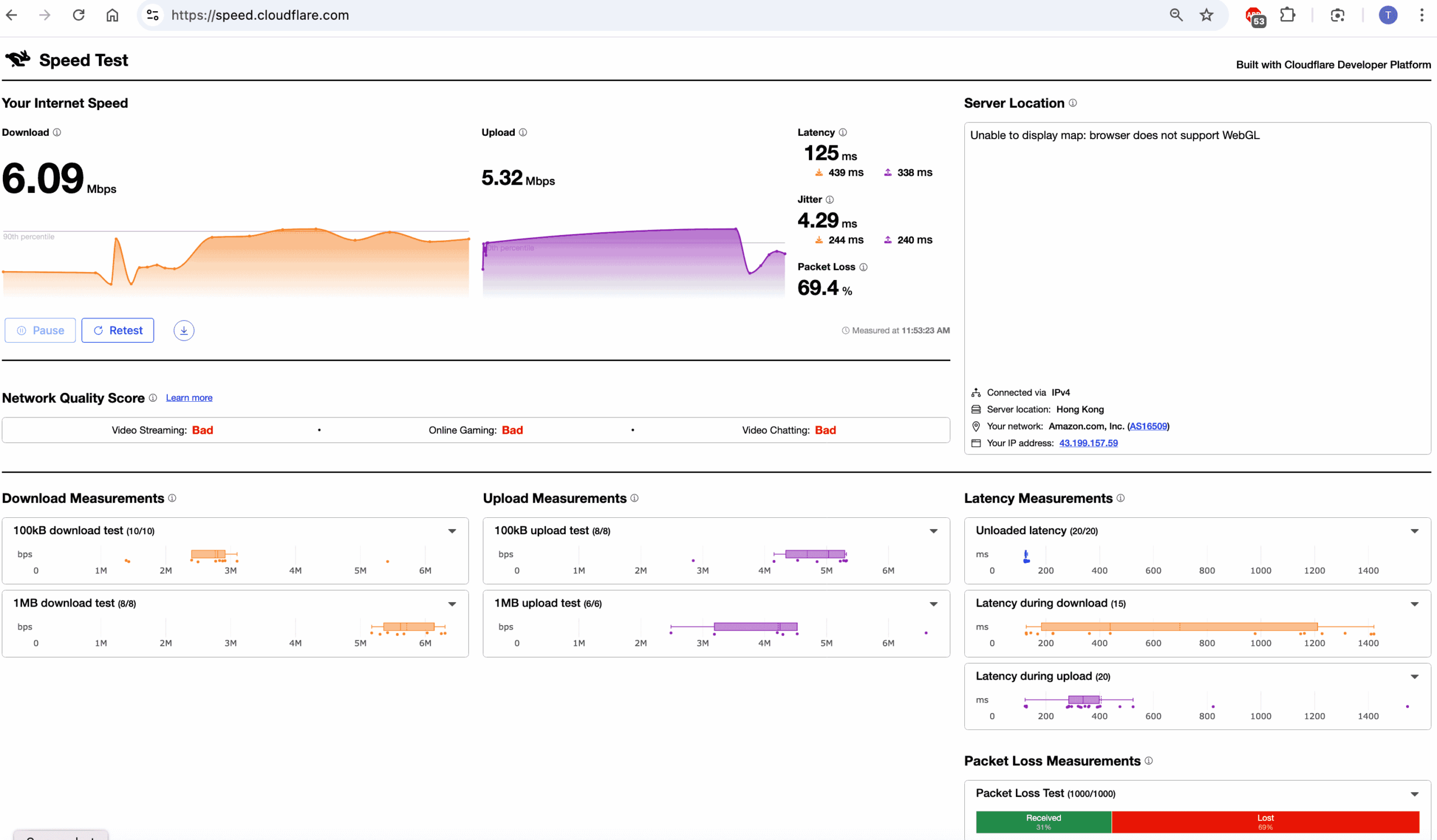
The AWS EC2 Hong Kong server shows a stable but heavily capped connection from Shenzhen, with direct ping indicating 0% loss and 123 ms latency, yet iperf3 throughput averages only ~2.7 Mbits/sec—similar to the Alibaba server’s 4 Mbps cap. The Cloudflare speed test via V2Ray reveals 69% packet loss and “Bad” network quality, confirming that the proxy tunnel introduces catastrophic degradation (likely due to TCP-over-TCP meltdown or ISP throttling of V2Ray traffic).
- Direct iperf3: Throughput is low and erratic (e.g., a 3-second gap with zero transfer). This indicates the cross-border path is rate-limited to around 3–4 Mbps, despite zero ICMP loss. The 123 ms latency is higher than Alibaba’s 15 ms, but the throughput cap is similar.
- Via V2Proxy: 69% packet loss, 6 Mbps download/5 Mbps upload (likely inflated by retransmits), and “Bad” scores. The proxy turns a stable but capped link into an unusable one.
The AWS server offers no improvement over Alibaba; both are capped at ~4 Mbps and become unusable through the proxy. Without changing the V2Ray transport or using obfuscation, you will not get a reliable streaming experience.
Based above result, we suppose that two reasons caused proxy failure:
TCP-over-TCP: V2Ray’s default TCP-based transport over a TCP connection causes “meltdown” under loss or high latency, amplifying congestion.
ISP Deep Packet Inspection: China ISP may detect and throttle V2Ray traffic, causing packet drops when the tunnel is active.
Hence, we came back to Hong Kong, and launched a new server to check it.
Protocol: V2Ray
Provider: GCP
Location: Singapore(asia-southeast1)
Data plan: 5GB, 12 Hours
Expire at: 2026-02-21 03:20:08 UTC
ping -c 10 149934552.uuquuq.xyz
PING 149934552.uuquuq.xyz (34.143.174.164): 56 data bytes
64 bytes from 34.143.174.164: icmp_seq=0 ttl=57 time=62.708 ms
64 bytes from 34.143.174.164: icmp_seq=1 ttl=57 time=61.088 ms
64 bytes from 34.143.174.164: icmp_seq=2 ttl=57 time=61.684 ms
64 bytes from 34.143.174.164: icmp_seq=3 ttl=57 time=61.524 ms
64 bytes from 34.143.174.164: icmp_seq=4 ttl=57 time=60.615 ms
64 bytes from 34.143.174.164: icmp_seq=5 ttl=57 time=60.995 ms
64 bytes from 34.143.174.164: icmp_seq=6 ttl=57 time=61.566 ms
64 bytes from 34.143.174.164: icmp_seq=7 ttl=57 time=60.720 ms
64 bytes from 34.143.174.164: icmp_seq=8 ttl=57 time=60.471 ms
64 bytes from 34.143.174.164: icmp_seq=9 ttl=57 time=60.232 ms

--- 149934552.uuquuq.xyz ping statistics ---
10 packets transmitted, 10 packets received, 0.0% packet loss
round-trip min/avg/max/stddev = 60.232/61.160/62.708/0.695 ms
iperf3 -s -p 1080
-----------------------------------------------------------
Server listening on 1080
-----------------------------------------------------------
Accepted connection from 183.179.207.227, port 55089
[ 5] local 10.148.0.56 port 1080 connected to 183.179.207.227 port 55090
[ ID] Interval Transfer Bitrate
[ 5] 0.00-1.27 sec 9.75 MBytes 64.5 Mbits/sec
[ 5] 1.27-2.02 sec 3.62 MBytes 40.2 Mbits/sec
[ 5] 2.02-3.05 sec 4.25 MBytes 34.7 Mbits/sec
[ 5] 3.05-4.03 sec 5.25 MBytes 44.8 Mbits/sec
[ 5] 4.03-5.05 sec 5.88 MBytes 48.6 Mbits/sec
[ 5] 5.05-6.21 sec 4.25 MBytes 30.7 Mbits/sec
[ 5] 6.21-7.02 sec 2.88 MBytes 29.9 Mbits/sec
[ 5] 7.02-8.05 sec 3.88 MBytes 31.5 Mbits/sec
[ 5] 8.05-9.07 sec 4.00 MBytes 33.1 Mbits/sec
[ 5] 9.07-10.05 sec 4.12 MBytes 35.3 Mbits/sec
[ 5] 10.05-11.05 sec 4.62 MBytes 38.7 Mbits/sec
[ 5] 11.05-12.03 sec 5.00 MBytes 42.6 Mbits/sec
[ 5] 12.03-13.03 sec 5.38 MBytes 45.4 Mbits/sec
[ 5] 13.03-14.03 sec 5.50 MBytes 46.1 Mbits/sec
[ 5] 14.03-15.03 sec 6.25 MBytes 52.4 Mbits/sec
[ 5] 15.03-16.19 sec 4.75 MBytes 34.2 Mbits/sec
[ 5] 16.19-17.07 sec 3.12 MBytes 29.9 Mbits/sec
[ 5] 17.07-18.06 sec 2.50 MBytes 21.1 Mbits/sec
[ 5] 18.06-19.07 sec 3.12 MBytes 26.0 Mbits/sec
[ 5] 19.07-20.08 sec 2.38 MBytes 19.6 Mbits/sec
[ 5] 20.08-21.11 sec 2.00 MBytes 16.4 Mbits/sec
[ 5] 21.11-22.11 sec 2.00 MBytes 16.8 Mbits/sec
[ 5] 22.11-23.00 sec 2.00 MBytes 18.7 Mbits/sec
[ 5] 23.00-24.08 sec 2.88 MBytes 22.5 Mbits/sec
[ 5] 24.08-25.04 sec 3.00 MBytes 26.1 Mbits/sec
[ 5] 25.04-26.03 sec 3.38 MBytes 28.5 Mbits/sec
[ 5] 26.03-27.03 sec 3.88 MBytes 32.4 Mbits/sec
[ 5] 27.03-28.04 sec 4.38 MBytes 36.5 Mbits/sec
[ 5] 28.04-29.04 sec 3.25 MBytes 27.3 Mbits/sec
[ 5] 29.04-30.05 sec 4.00 MBytes 33.2 Mbits/sec
[ 5] 30.05-30.09 sec 128 KBytes 27.5 Mbits/sec
- - - - - - - - - - - - - - - - - - - - - - - - -
[ ID] Interval Transfer Bitrate
[ 5] 0.00-30.09 sec 121 MBytes 33.8 Mbits/sec receiver
iperf3 -c 149934552.uuquuq.xyz -t 30 -i 3 -p 1080
Connecting to host 149934552.uuquuq.xyz, port 1080
[ 7] local 192.168.1.112 port 55090 connected to 34.143.174.164 port 1080
[ ID] Interval Transfer Bitrate
[ 7] 0.00-3.00 sec 18.1 MBytes 50.7 Mbits/sec
[ 7] 3.00-6.00 sec 14.9 MBytes 41.6 Mbits/sec
[ 7] 6.00-9.00 sec 10.9 MBytes 30.4 Mbits/sec
[ 7] 9.00-12.00 sec 14.0 MBytes 39.1 Mbits/sec
[ 7] 12.00-15.00 sec 17.2 MBytes 48.3 Mbits/sec
[ 7] 15.00-18.00 sec 10.0 MBytes 27.9 Mbits/sec
[ 7] 18.00-21.00 sec 7.38 MBytes 20.6 Mbits/sec
[ 7] 21.00-24.00 sec 6.88 MBytes 19.2 Mbits/sec
[ 7] 24.00-27.00 sec 10.4 MBytes 29.0 Mbits/sec
[ 7] 27.00-30.00 sec 11.6 MBytes 32.5 Mbits/sec
- - - - - - - - - - - - - - - - - - - - - - - - -
[ ID] Interval Transfer Bitrate
[ 7] 0.00-30.00 sec 122 MBytes 34.0 Mbits/sec sender
[ 7] 0.00-30.09 sec 121 MBytes 33.8 Mbits/sec receiver
iperf Done.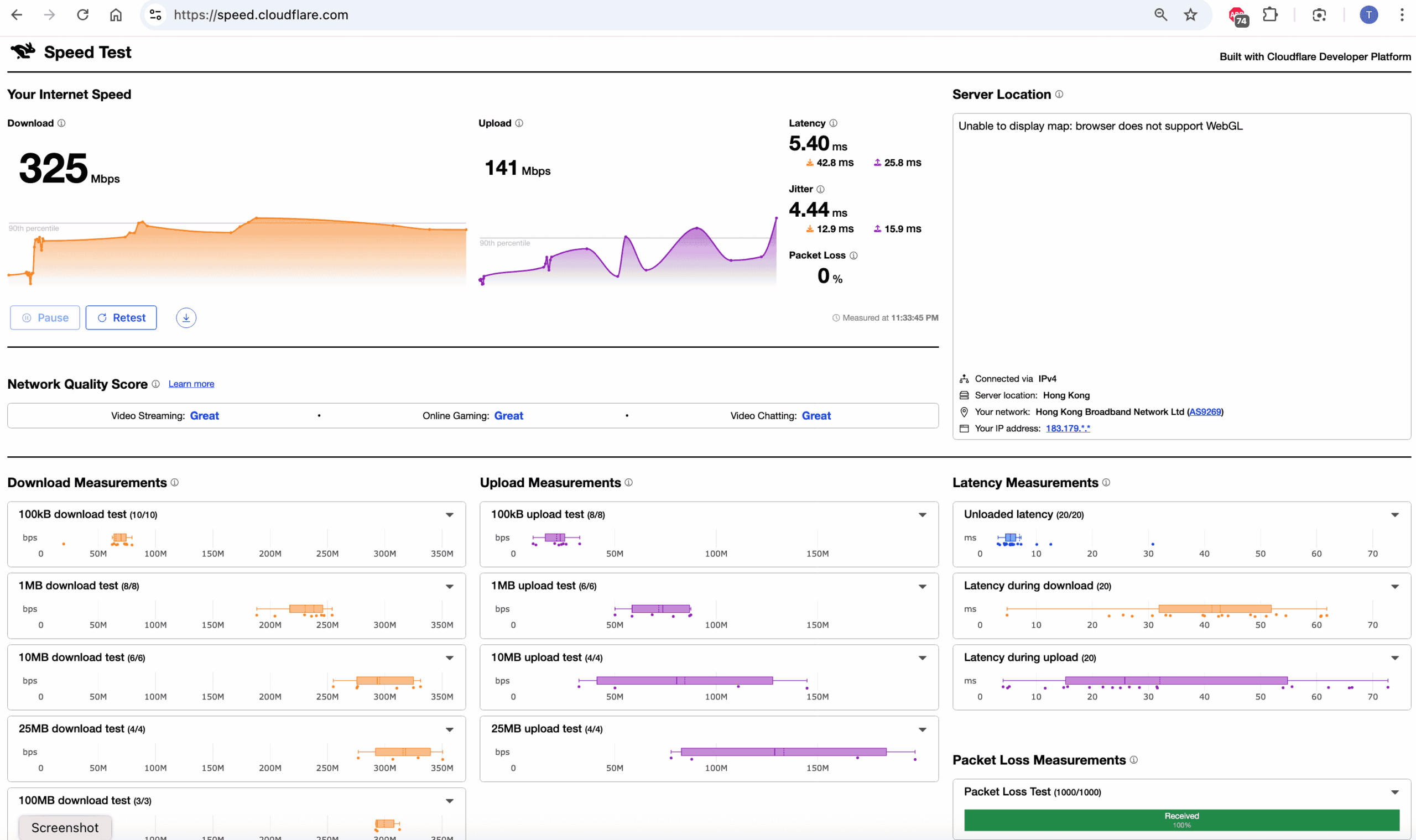
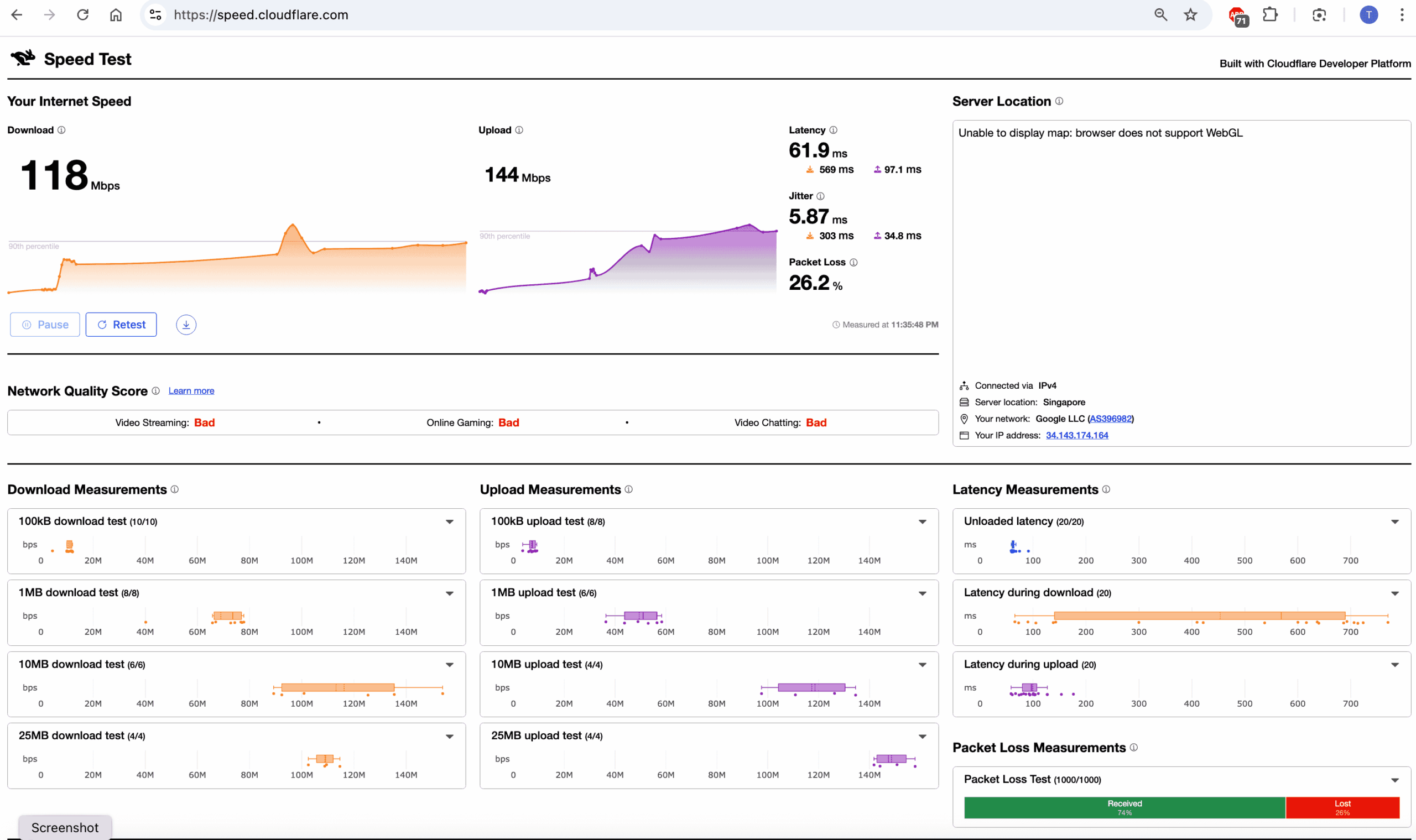
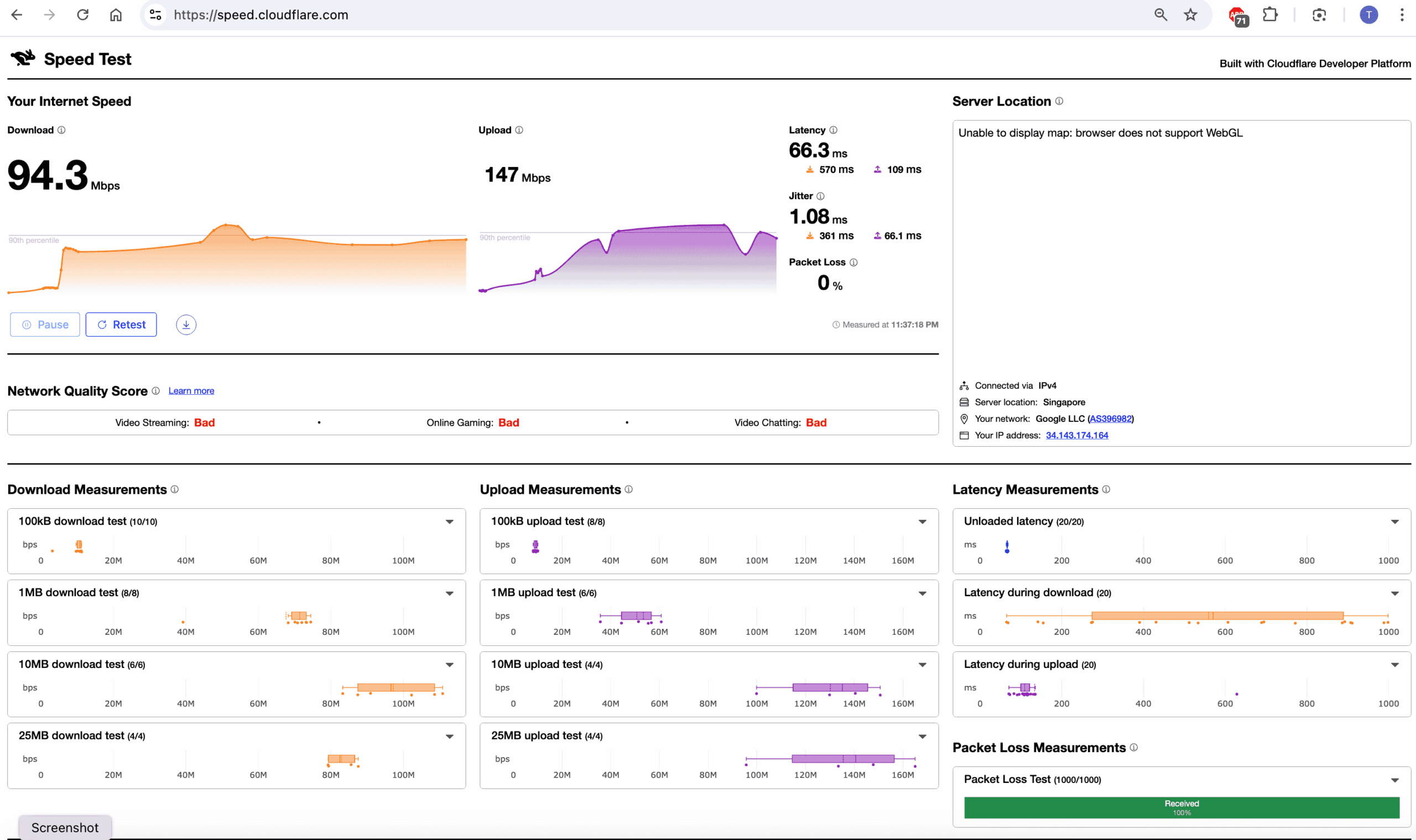
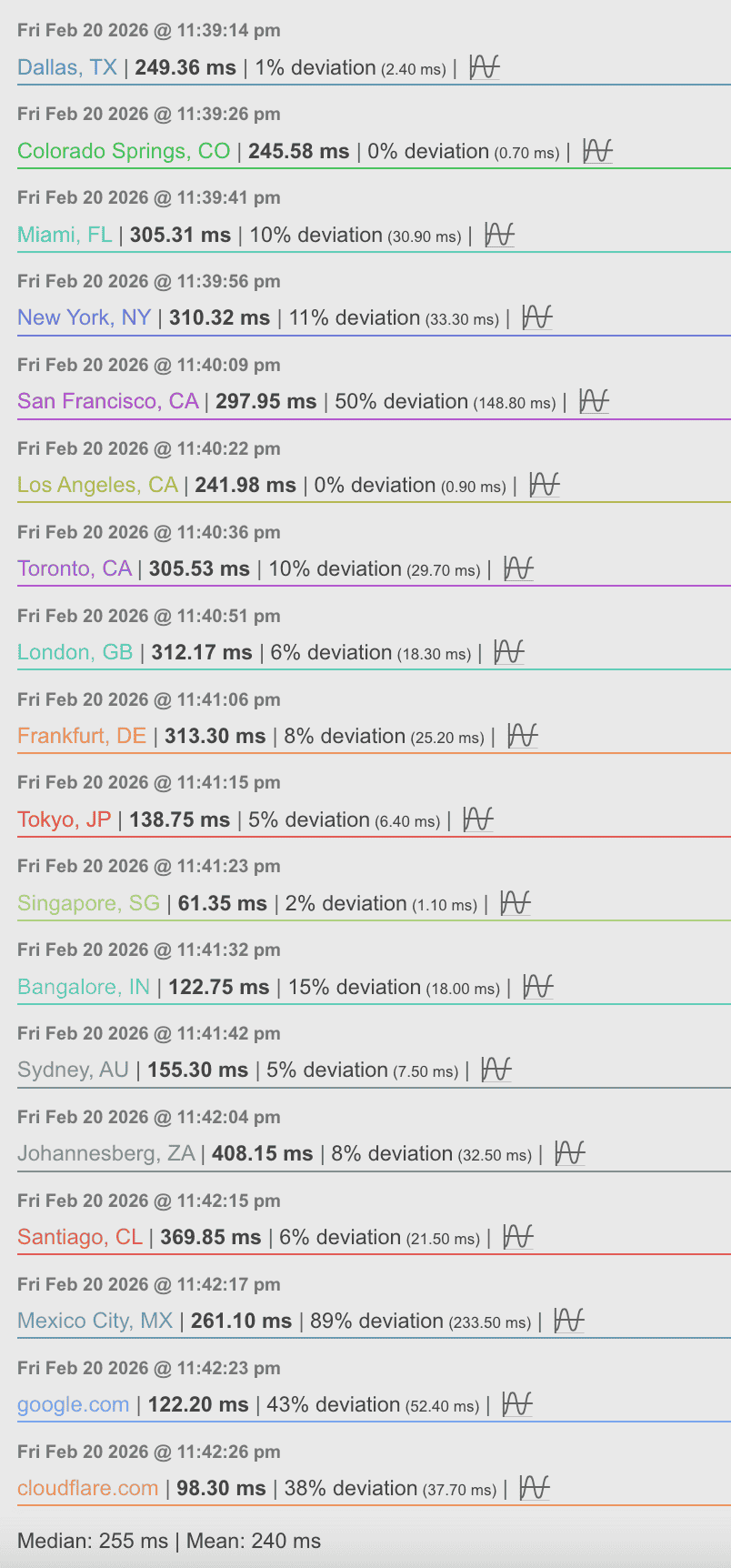
The new GCP Hong Kong server provides an excellent direct connection from Hong Kong:
- 0% packet loss, ~61 ms latency, and 34 Mbps stable throughput (iperf3).
This is a huge improvement over previous servers (e.g., earlier GCP HK had 20% loss, AWS HK 123 ms). Your local broadband is capable of 325 Mbps with 0% loss (g1.png), so the bottleneck is not your ISP.
However, when using V2Ray, performance degrades significantly:
- With UDP relay off (g3.png): ~94 Mbps but high jitter (spikes to 570 ms) and “Bad” quality, likely due to TCP‑over‑TCP meltdown or ISP interference.
- With UDP relay on (g2.png): ~118 Mbps but 26% packet loss, making real‑time apps unusable.
Conclusion: if you turn on UDP relay on your v2ray client, you can get fast speed, but will get packages lose, suggest not use it on realtime chat or finance chart or tradings(use UDP relay off).